
Wispr Flow Review (2026): Pricing, Free Plan Limits, and Which Discounts Are Real
Wispr Flow is the most finished cloud dictation app on the market right now, and after two weeks of using it most people either stop typing long messages or go back and never think about it again. Pro costs $15 a month, or $144 a year if you pay upfront. It is worth that money if you draft a lot of text every day. One practical thing to know before you pay: it is a cloud service with no offline mode, so for flights, dead zones and NDA-bound work you will want a locally processed tool alongside or instead (we cover those in the alternatives guide).
Wispr Flow Pro is worth $144 a year if you draft text every day and your work is not covered by rules about third-party processing. Pay for the year rather than the month: that is the one discount available to everybody, and it saves $36. Signing up through that link gives you 30 days of Pro instead of 14, and gives us a commission if you eventually pay.
Skip it if you need dictation without the internet, or if you work on Linux, an iPad, a Chromebook, an ARM Windows machine or a remote desktop. There is no offline mode at any price, and those platforms are not supported at all.
That is the short answer. The rest of this page is the detail, because the detail is where this app gets interesting and where most reviews of it are now wrong.
How this review was put together
I did not run a stopwatch test. Where you see a speed or memory number here, it came from someone who did measure it, and I say who and when. What I did do, on 27 August 2026, is read every relevant page Wispr AI publishes: the pricing page, the help centre articles on plans, discounts and referrals, the India page, the Android page, the student page, the data controls page, the security FAQ, the supported devices list, and the changelog. Most published reviews of Wispr Flow date from February to June 2026 and quote each other. Several of their numbers no longer match what the vendor says. I have flagged those as I go.
Wispr Flow at a glance
| What it is | Cloud AI dictation that types into any text field on your device |
|---|---|
| Platforms | macOS 12+, Windows 10/11 (x64 only), iPhone (iOS 18.3+), Android 13 to 16 |
| Not supported | iPad, Linux, Chromebooks, virtual machines, remote desktop, Windows on ARM |
| Free plan | 2,000 words/week on desktop (hard stop at 5,000), 1,000/week on iPhone (hard stop at 1,500) |
| Pro | $15/month, or $144/year, which works out at $12/month |
| Cheapest legitimate route | India: ₹400/month, ₹320/month annually, UPI accepted |
| Students | 3 months free, then $6/month |
| Free trial | 14 days by default, 30 days if you sign up through a referral link |
| Works offline | No, not on any plan |
| Languages | 100+, of which 7 are tuned to English-level quality |
| Where your data goes | Processed and stored in the United States only |
| Compliance | SOC 2 Type I (April 2026), ISO 27001 Stage 1 (April 2026), HIPAA BAA available |
| Newest feature | Notetaker for meetings, launched 5 August 2026, Mac only, English only |
What Wispr Flow actually is
You hold a hotkey, you talk, you let go, and formatted text appears wherever your cursor was. Not a transcript with no punctuation. Formatted text, with the filler words stripped out, the sentences cleaned up, and the tone roughly matched to the app you are in. Slack gets something loose. Gmail gets something that reads like an email.
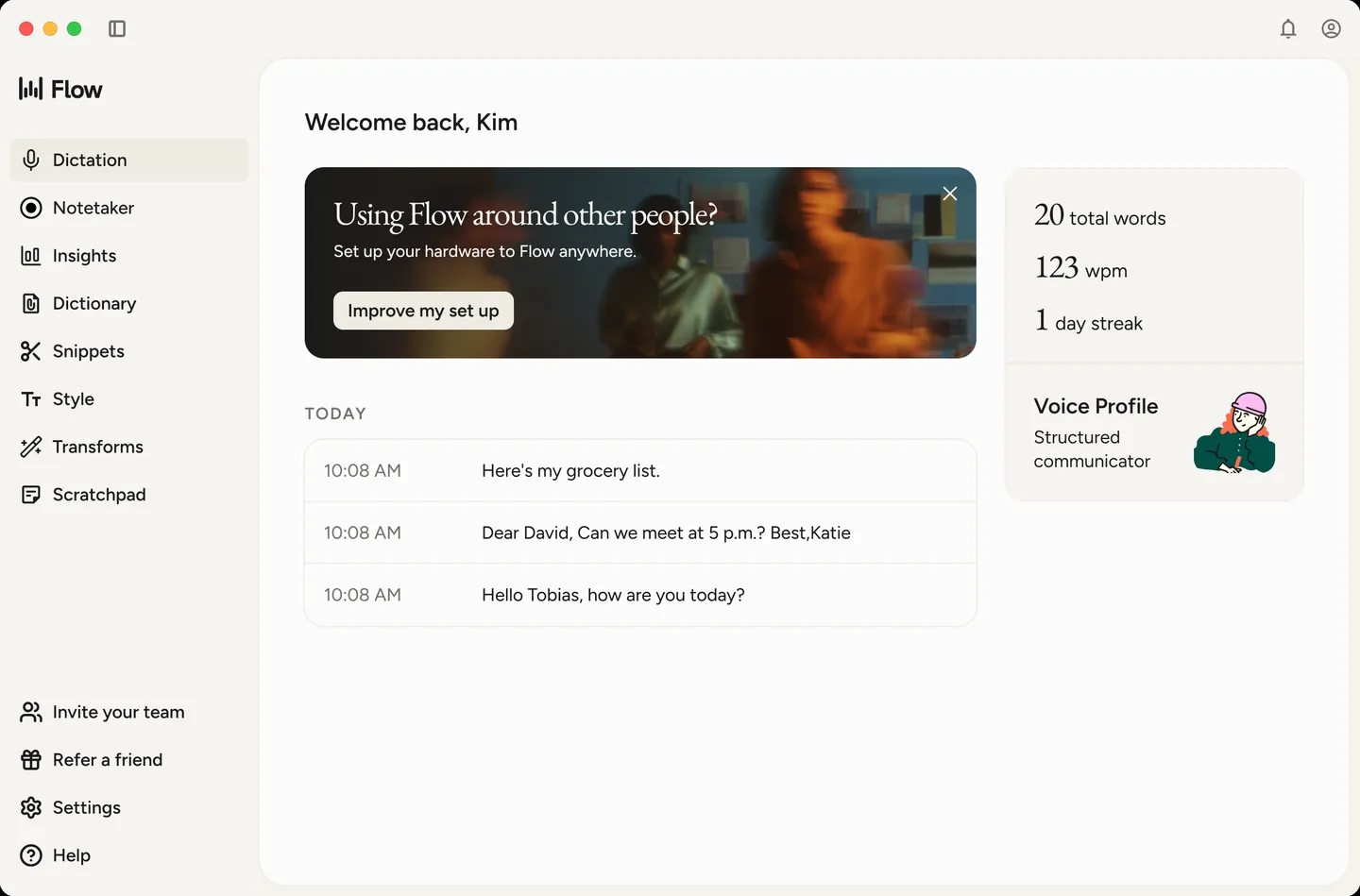
That last part is the actual product. Plenty of software turns speech into words. Wispr Flow's bet is that the annoying part of dictation was never the recognition, it was having to go back and fix everything afterwards, and that a language model sitting between the microphone and your text field solves it. On the whole the bet pays off, which is why the app has raised over $81 million and was valued at $700 million in its last round, according to TechCrunch.
The cost of that bet is architectural, and it explains almost every complaint in this review. The cleanup happens on servers. So the app needs the internet, it needs your audio, and to match tone to context it needs to know something about what is on your screen.
The free plan, and the second limit nobody mentions
Every review says the free tier gives you 2,000 words a week on desktop. That is true and it is also incomplete.
Wispr's own help centre article on plans describes two numbers per platform, a soft cap and a hard cap. On Mac and Windows the soft cap is 2,000 words and the hard cap is 5,000. On iOS it is 1,000 soft and 1,500 hard. In practice that means the app starts warning you well before it stops you, and you have more runway than the headline figure suggests. I have not seen this documented in any other review.
Two thousand words is roughly fifteen minutes of steady dictation, so a genuinely daily user will bump into the warning by Wednesday. A person who dictates a few long emails a week will not.
Android is the odd one out and deserves its own line: it is not a keyboard there. It is a floating bubble that appears over whatever keyboard you already use, and it needs Android 13 or newer. Wispr's Android page sets out the requirements.
Wispr Flow pricing in full
Straight from wisprflow.ai/pricing as of 27 August 2026:
| Plan | Monthly | Annual | What you get |
|---|---|---|---|
| Free | $0 | $0 | Weekly word caps above, 100+ languages, no card needed |
| Pro | $15/user | $144/user ($12/month) | Unlimited dictation, Command Mode, advanced models, higher meeting limits, longer retention |
| Enterprise | Custom | Custom | SOC 2, ISO 27001, HIPAA BAA, SAML SSO, SCIM, audit logs, MDM, volume pricing |
Annual billing saves you 20%, which is $36 a year. There is no lifetime licence and there never has been.
One correction worth making: a lot of currently ranking reviews still list a "Teams" tier at $10 to $12 per seat with a three seat minimum. That tier is not on the pricing page any more. The help centre now describes a team product called Flow Growth, billed monthly or annually, priced at checkout rather than published, available as dictation only or bundled with unlimited Notetaker, with a 14 day trial for whoever creates the team. If you are budgeting for a team, you will have to go through checkout to see the number.
The India price
Wispr AI runs exactly one regional price, and it is a big one. On wisprflow.ai/india, Pro is ₹400 per user per month, or ₹320 per month billed annually, and the checkout accepts UPI alongside the usual cards. At late August 2026 exchange rates that annual figure is somewhere around $3.60 a month, roughly a quarter of the US price, for the same product.
This is not a promo. It is a standing regional price, and it exists because India is Wispr's second largest install base while contributing a small share of revenue.
The discounts that exist, and the coupon codes that do not
Search "wispr flow promo code" and you get one official page surrounded by seven coupon aggregators promising, between them, $15 off, 20% off, an extra 25% off, a free month, 20% cashback, and "22 verified codes". Those offers are mutually incompatible, which is a reliable sign that most of them are invented.
Here is the honest position. Wispr AI does not publish public promo codes. Its discounts page lists eligibility categories and, deliberately, no percentages. The promo code field itself only appears while you are on the free plan or an unconverted trial, so if you already pay, there is nowhere to type a code even if you had one.
What genuinely reduces the bill:
Annual billing. 20% off, no application needed, $144 instead of $180.
Student. The best deal by a distance. Sign up with a .edu address and, per wisprflow.ai/students, it auto-activates: three months free, then $6 a month, which is 50% off. If your address is not recognised, you can submit a student ID, enrolment letter, fee receipt or dashboard screenshot instead. The three free months are for new subscribers only. The help centre also mentions an extended 90 day trial for verified students, and notes that anyone on a Team, Business or Enterprise subscription is excluded from the student rate even if their student status checks out.
Educator. Same route, but reviewed manually through the support form rather than auto-applied. No published percentage.
Non-profit, military, senior, accessibility. All four are listed as real categories on the discounts page, all four require you to submit verification through the support form or the desktop app, and none of them has a published rate. Reviews typically take a few business days.
India. Covered above. Not a discount so much as a different price list.
Referral. Wispr's referral programme gives whoever signs up through a link a 30 day Pro trial rather than the standard 14, regardless of what plan the referrer is on. The person doing the referring earns a free month of Pro, credited on their next bill, once the new user dictates 2,000 words or upgrades. Only accounts paying through the Wispr website earn credit; App Store subscribers and Enterprise members can share links but collect nothing.
So the realistic best case for an ordinary US buyer is $144 a year. For a student it is $6 a month after a free quarter. For anyone paying in India it is a different conversation entirely. Everything else you will read about Wispr Flow coupons is noise.
The free trial comes in four different lengths
This is the other thing the field gets wrong. Almost every review states flatly that the trial is 14 days. The help centre lists four durations:
- 14 days as standard, with no credit card required;
- 30 days if you sign up through someone's referral link;
- 3 months for verified students;
- up to 7 extra days earned through the "100 Words a Day Challenge".
Fourteen days is not really enough to find out whether dictation changes how you work, because the first few days go on retraining your own habits rather than testing the software. A month is. If you want the longer trial, signing up through our referral link gets you the 30 day version, and gets us a commission if you eventually pay. Both halves of that sentence are true and you should weigh them accordingly.
Platforms, and the gaps
Supported, per Wispr's device requirements: macOS 12 Monterey and up, Windows 10 and 11 on x64, iPhone on iOS 18.3 and up as a third party keyboard, and Android 13 through 16 as a floating bubble.
The exclusions are stated just as plainly, and I will quote them because they catch people out: "iPad, Linux, Chromebooks, and virtual machines or remote desktop environments are not supported." Windows on ARM is refused outright with the message "Wispr Flow requires x64 architecture", which means a Surface with a Snapdragon chip is out.
Two of those hurt more than the rest. No iPad support is strange for an app whose iPhone keyboard is well liked. And no support for virtual machines or remote desktop rules out a large slice of corporate hardware, which sits oddly next to the enterprise compliance push.
Languages: 100 plus, but seven of them are the real ones
Wispr's language research page is more honest than the marketing headline. Support comes in bands.
Seven languages have been trained and tuned to match English performance, including punctuation, list handling and regional formatting conventions: French, German, Hindi, Italian, Portuguese, Spanish and Thai.
A second group of roughly fifteen gets accurate dictation without that formatting polish: Arabic, Cantonese, Dutch, Hebrew, Indonesian, Japanese, Korean, Mandarin, Polish, Russian, Swedish, Turkish, Ukrainian, Vietnamese and others. Beyond that sit 75 or more languages with basic support.
Mixed language dictation works well, which is the single most praised thing in reviews from Indian users switching between Hindi and English mid sentence.
Notetaker: the newest part, and the one nobody has reviewed
On 5 August 2026 Wispr shipped Notetaker, a meeting recorder that does not join your calls. It captures system audio, produces a live transcript, and generates summaries, decisions, action items and speaker attribution. It reads your calendar to know who is in the room, and it connects to Claude and ChatGPT through MCP so you can query your meeting history from a chat window.
The constraints at launch are significant. Mac only, with Windows listed as coming. English only, against 100+ languages for dictation. The free plan includes it with a weekly meeting cap; Pro raises the cap and extends how long transcripts are kept.
TechCrunch spotted it before the announcement by reading the updated terms of service, which now cover "meeting audio, participant information, meeting metadata, speaker labels, meeting transcripts". Wispr declined to comment at the time.
I flag this because if you are reading a Wispr Flow review published before August 2026, and most of the ones ranking today were, it does not know this feature exists.
Data handling: what to check before a work machine
Wispr Flow is a cloud service: dictation is processed on Wispr's servers, with processing and storage in the United States, and there is no offline mode on any plan (security and compliance FAQ). For everyday writing that is simply how the product works. If your work sits under an NDA or a data residency requirement, clear it with your team first, or look at locally processed tools in our alternatives guide.
Two settings are worth a minute after install, both under Settings, Data and Privacy. Context Awareness shares what is on your screen with the servers so that names and jargon come out right; its help page lists exactly what it reads, password fields, URL bars and banking apps are excluded, and the whole feature can be switched off. Improve the model for everyone controls whether your audio helps improve Wispr's models. It is presented during onboarding already selected, and you switch it off in the same place. Older help pages call the same control Privacy Mode, worded the other way round: Privacy Mode is on by default for Enterprise and HIPAA accounts and off on standard ones.
On the compliance side: SOC 2 Type I completed April 2026 by A-LIGN with a clean opinion, ISO 27001:2022 Stage 1 April 2026 with Stage 2 scheduled for June, a HIPAA BAA available for healthcare customers, and zero data retention agreements with all third party AI providers, meaning subprocessors cannot train on your content (data controls).
What people complain about
Windows. This is the loudest and most consistent complaint, and it comes from measurement rather than mood. The Windows client is Electron based and several independent reviewers, including one who profiled it in May 2026, report roughly 800 MB of RAM and around 8% CPU while idle. Users describe it freezing target apps during dictation, and a Product Hunt reviewer posting as Shaunny reports repeated crashes. Wispr's changelog shows it is being worked on: the 21 August 2026 desktop release changed Windows startup so the app "starts quietly in the background when it launches at login", which reads like a direct answer to complaints about it re-adding itself to startup.
Reliability after the trial ends. A recurring accusation, repeated on Reddit and in coverage on Medium and elsewhere, is that quality drops once you convert to paid. I could not verify it and I would treat it with caution: it is the kind of pattern people also perceive when the novelty wears off. It comes up often enough to be worth knowing about.
Setup friction. Several reviewers mention that granting accessibility and microphone permissions takes longer than expected, particularly on Mac.
The ratings picture is a mess, and one number in it has vanished. Product Hunt currently shows 4.7 out of 5 across 76 reviews. Reviews published in spring 2026 also cite G2 at 4.5 across 16 reviews, the iOS App Store at 4.8 across 8,500+, Google Play at 3.6 across 986, and Trustpilot at 2.7 across 39. That last figure gets quoted constantly as evidence that consumers hate the app. Checking it on 27 August 2026, the Trustpilot page for wisprflow.ai returns "This profile has been removed. The business you're trying to find goes against our guidelines and is no longer visible on Trustpilot." Trustpilot does not say who breached what. Either way, the 2.7 that half the internet is citing can no longer be verified at source, and you should discount any review that presents it as current.
What I like, and what I do not
- the speed claim holds up under people who measured it: Zachary Proser, who works in applied AI at WorkOS, published his own dashboard on 1 August 2026 showing 182,718 words dictated across 36 applications at an average of 184 words per minute, against his own keyboard baseline of 90;
- it works everywhere without per-app setup: one hotkey, any text field, no integrations to configure;
- the cleanup is the feature. Removing "um" and turning a rambling thought into a sentence is worth more day to day than another point of raw recognition accuracy;
- multilingual and code-switching dictation is genuinely strong, which is rare;
- the Android app leaves your keyboard alone: it is a floating button over whatever keyboard you already use, not a replacement for it;
- you can try it properly without a card, and the free tier is usable rather than a demo.
- no offline mode at any price, which rules out flights, poor connections, and NDA-bound work in one stroke;
- US-only processing, with no regional option;
- the Windows client's resource use, and no support for Windows on ARM;
- subscription only. At $144 a year, three years of Wispr Flow costs more than most people spend on a keyboard, a mouse and a monitor stand combined;
- no iPad, no Linux, no Chromebook, and no virtual machines;
- Notetaker is Mac-only and English-only, so the headline feature of 2026 is unavailable to most of the user base.
Who it is for
You write a lot: emails, docs, Slack, prompts, briefs, code comments. You are on a Mac. You are comfortable thinking out loud, which is a real skill and not everyone has it. Your work is not covered by rules about third party processing. If that describes you, the honest expectation is that within a fortnight you will stop typing anything longer than a sentence, and $12 a month will feel like nothing against the time back.
The strongest cases I keep seeing are people with RSI or carpal tunnel, for whom this is assistive technology rather than a convenience, and people writing in a second language, where speaking is faster and less exhausting than typing.
Who should skip it
You need dictation that works with no internet. You work under an NDA or a compliance regime that will not accept US cloud processing with opt-out training. You are on Linux, a Chromebook, an iPad, an ARM Windows machine, or a VDI. You dictate occasionally enough that 2,000 words a week is fine, in which case stay on free and ignore the upgrade prompts. Or you simply will not pay a subscription for something you expect to own.
If any of those apply, our roundup of Wispr Flow alternatives covers the locally processed and one-off-purchase options, and our platform guides go deeper on dictation for Mac and dictation for Windows.
Cancelling and getting your money back
Cancel from Plans and Billing in Settings. Per Wispr's account help page, your subscription runs to the end of the current billing period and you keep full paid access until then.
Refunds are handled case by case through support rather than by published policy, and outcomes range from a full refund to a prorated one to a plain cancellation. If you subscribed through the App Store, cancel in iOS Settings under your Apple ID and request refunds at reportaproblem.apple.com, because Wispr cannot process those.
One trap worth avoiding: deleting your account is not the same as cancelling. The help page states that deleting kills an active paid subscription immediately "with no prorated refund", and cannot be undone. Cancel first, then delete if you want to.
What to do next
If your work has to stay off other people's servers, or you are on Linux, an iPad or a remote desktop, stop here and read the alternatives instead. No setting inside Wispr Flow fixes those.
Otherwise the honest test takes a month, not an afternoon. Take the 30 day trial rather than the standard 14 day one, turn off Context Awareness and model training on day one, and see whether you still want it in week four. If you do, pay for the year: $144 instead of $180, and $6 a month if you have a student address.
Comments
No comments yet. Ask a question or share what worked for you.