
Voice to text not working on Android? Start with your symptom
You open a chat, ready to dictate a reply, and the microphone is gone. Or you pause after a word and voice typing stops. Start with what you see to find the next check.


Jump to your symptom:
- Mic missing: Samsung microphone · Gboard microphone
- Greyed out or no permission: Check microphone access
- Stops after one word or stays on “Initializing”: Check Gboard voice typing
A missing button, blocked microphone access and interrupted dictation need different checks. A missing icon alone does not mean your microphone is broken.
Need to finish your reply now? Try Aqua Voice.
More checks and a way to keep dictating:
Where did the Samsung microphone go?
Look at the bottom left of the screen. In the Samsung interface shown below, the voice input button sits there, away from the keyboard keys.
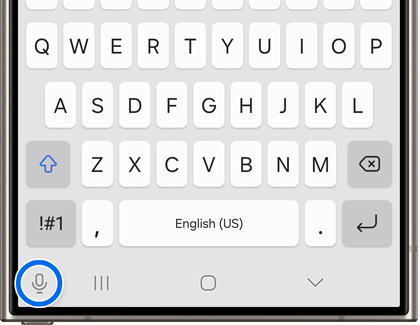
Nothing there either? Make the keyboard button visible, then choose which voice input it should open.
- Open Settings → General management → Keyboard list and default.
- Turn on Keyboard button on navigation bar.
- Open Samsung Keyboard settings → Voice input.
- Choose Samsung voice input or Google Voice Typing. Samsung voice input works with Samsung Keyboard.
Open a note, find the microphone and say: “I’ll be there at seven.” If the words appear, try the same phrase in your chat.
Why does it still say no permission?
Microphone access is a phone-wide switch. Each app also needs permission to use it, so check the phone first, then follow the steps for your keyboard.
On Android 12 or later, open quick settings and turn on Microphone access.
If you use Gboard, open Settings → Apps → Gboard → Permissions → Microphone. Choose Allow only while using the app. With Samsung Keyboard, tap its voice input microphone and allow access if prompted. To review a previous denial, open Settings → Apps, choose the app that requested access, then Permissions → Microphone and allow access.
Try “I’ll be there at seven” in a note. If it appears, test your original app too.
Still no words? Record yourself in a voice recorder you already have and play it back. If microphone access is on but the recording is silent, contact your phone’s support team. Another dictation app cannot bypass a phone-wide microphone block.
How do I get Gboard typing again?
If Gboard’s microphone has disappeared, stays on “Initializing” or stops after one word, check voice typing itself. Once microphone access is allowed, these steps help you find out whether Gboard can turn your speech into text.
Do one thing, then test in a note:
- Open Gboard settings → Voice typing and turn on Voice typing. Say: “I’ll be there at seven.”
- Still stuck? Open Settings → Apps → Gboard → Storage and cache → Clear cache. Try the phrase again.
- Update Gboard. Test again.
- Restart your phone. Test once more.
If the phrase appears in your note, go back to the original app and repeat it there. If only that field refuses the text, focus the next check on that app.
Having this problem in WhatsApp? Follow the checks for that message field.
How can I get voice typing going on my Pixel?
An unavailable advanced voice typing option can leave you wondering whether you can dictate at all. Try ordinary voice typing with “I’ll be there at seven.” It may already give you the words you need. If it works in a note, try your reply field too.
For advanced voice typing, check this card:
Check these before trying advanced voice typing again.
- Phone: Pixel 6 or later.
- Language: English, French, German, Italian, Japanese or Spanish.
- Match: the phone’s main language and Gboard’s main language must be the same.
- Updates: connect to Wi-Fi to let advanced voice typing update automatically, restart your phone and leave it charging overnight. On Android 12, also update Android System Intelligence through Google Play.
After those checks, try advanced voice typing again with the same short phrase.
How can I finish my reply and keep my keyboard?
The voice recorder picks up your voice, but your keyboard’s dictation still cuts off. You have a reply to finish, and changing the keys you use every day feels like another job.
Aqua Voice lets you keep your keyboard and dictate from its own floating button. On Android 10 or later, it puts the text where your cursor is and adds punctuation, so you can finish the message you started.
Want to change part of the reply? Select the text and use Edit to make the change by voice.
That separate button gives you another way to start dictation when the keyboard’s voice input lets you down. It cannot fix a faulty microphone.
Keep the keys you know and finish your message with the floating voice button. Try it with the reply you were about to send.
Put the cursor in your reply, dictate, check the text and send.
Fix and improve voice typing on your phone

Turn on voice to text on Android
Find the microphone in Gboard or Samsung Keyboard, dictate a message and make changes by voice.

Voice typing in WhatsApp
Dictate WhatsApp messages as written, ready-to-send text instead of recording voice notes, using a keyboard that works in every app.

Auto punctuation on Android and iPhone
Why no keyboard adds commas as you type, the punctuation switch on a Pixel, the words Gboard understands, and how to get commas without saying them.
Comments
No comments yet. Ask a question or share what worked for you.