
Local Whisper Server at Home: Three Ways to Keep Your Audio in the Flat
A local Whisper server is a program on your own computer that accepts audio and returns text over the same protocol OpenAI uses, which means a phone can talk to it exactly as it would talk to a cloud service. Three projects do this well enough to trust with a keyboard: Speaches, LocalAI and whisper.cpp. This page goes through what each one needs, and then does the part most guides skip, which is dictating from the phone rather than running curl on the machine that already has the server.
Speaches if you want the shortest path. Its whole purpose is an OpenAI-compatible speech endpoint, it ships docker compose files for processor and for CUDA, and it listens on port 8000.
LocalAI if you would rather run one server for several kinds of model, or if you have no graphics card and want the project with the busiest release history. Port 8080.
whisper.cpp if you want the lightest thing that will run, and you accept that out of the box it does not serve the OpenAI path at all and has to be told to.
The three servers side by side
Project liveness was read from GitHub on 10 September 2026. It is in the table because an abandoned server is a bad thing to build a daily habit on, and because two of these projects look similar until you notice how far apart their last releases are.
| Project | OpenAI protocol out of the box | Port | Runs on | Liveness, 10 September 2026 |
|---|---|---|---|---|
| Speaches, formerly faster-whisper-server | Yes, native /v1/audio/transcriptions | 8000 | Processor or CUDA, separate images | 3,657 stars, last push 8 September 2026, last tagged release v0.9.0-rc.3 from 27 December 2025 |
| LocalAI | Yes, native, with a curl example in the documentation | 8080 | Processor, no graphics card required | 49,024 stars, last push 10 September 2026, release v4.9.0 from 20 August 2026 |
| whisper.cpp in server mode | No: the default path is /inference | 8080 | Processor, and it is the lightest of the three | 53,578 stars, last push 10 September 2026, release b4938 from 20 August 2026 |
Speaches: the shortest path
Speaches exists to be an OpenAI-compatible speech endpoint, so nothing has to be adapted. The documentation offers docker compose files for three cases, processor, CUDA and CUDA with CDI, and the run is the usual one:
docker compose up --detachIf you would rather not keep compose files around, the same thing fits in one command. With a graphics card:
docker run --rm --detach --publish 8000:8000 --name speaches \
  --volume hf-hub-cache:/home/ubuntu/.cache/huggingface/hub \
  --gpus=all ghcr.io/speaches-ai/speaches:latest-cuda
Without one, swap the image for ghcr.io/speaches-ai/speaches:latest-cpu. Models are pulled separately, and pulling one in advance saves you a puzzled first request:
uvx speaches-cli model download Systran/faster-distil-whisper-small.enTwo things to keep in mind. The Speaches documentation does not state hardware requirements at all, so the memory table further down is the only guide you get. And the last tagged release is from December 2025 while the code was pushed this week, which is a project that lives in its main branch rather than in its releases.
LocalAI: one server for everything
LocalAI is a larger project that answers on the OpenAI protocol for several kinds of model, transcription among them, and it runs on a processor without a graphics card. Its documentation gives the request in full, which is also the quickest way to check that your server is alive before the phone gets involved:
curl http://localhost:8080/v1/audio/transcriptions \
  -H "Content-Type: multipart/form-data" \
  -F file="@<FILE_PATH>" -F model="<MODEL_NAME>"
Of the three it has the steadiest release rhythm: version 4.9.0 on 20 August 2026 and a push on the day we checked. The trade is size. You are installing a general model server to get one endpoint, and if transcription is all you want, Speaches is a smaller thing to keep running.
whisper.cpp: lightest, and the one that needs a flag
whisper.cpp has a server mode, and it is the least demanding of the three, but its default route is /inference, which is not the path an OpenAI client asks for. The flags that matter, read from the server's own help:
--inference-path PATH, default/inference. This is the one to change, because the keyboard will ask for/v1/audio/transcriptions.--host HOST, default127.0.0.1. Left alone, the server is reachable only from the machine it runs on, and the phone will never see it.--port PORT, default8080.--convert, described as "Convert audio to WAV, requires ffmpeg on the server". Worth knowing, because the keyboard sends OGG Opus rather than WAV.
Being honest about the status of this one: the flags above come from reading the server's help, not from a run of our own with a phone at the other end. Speaches and LocalAI advertise the OpenAI path as a feature, whereas here you are assembling it. If you want the assembly to be somebody else's problem, take one of the first two.
How much memory a model needs
Whisper comes in sizes, and the size decides both the accuracy and whether your machine can hold the model at all. The figures below are from the openai/whisper README, read on 10 September 2026, and they are video memory requirements.
| Model | Parameters | Memory |
|---|---|---|
| tiny | 39M | about 1 GB |
| base | 74M | about 1 GB |
| small | 244M | about 2 GB |
| medium | 769M | about 5 GB |
| large | 1550M | about 10 GB |
| turbo | 809M | about 6 GB |
For dictation from a phone, small or turbo is the sensible starting point: messages are short, and a model that answers in two seconds beats a model that is slightly more accurate four seconds later.
Point your phone at it
This is where most instructions stop and the interesting part begins. Five conditions have to hold at once, and if one of them does not, the connection test fails without telling you which.
- The phone and the computer are on the same network. The same Wi-Fi, not the phone on mobile data.
- The server listens beyond
127.0.0.1. A server bound to the loopback address answers itself and nobody else. In whisper.cpp that is--host; in the docker examples above the published port already covers it. - You know the computer's address on the network, which usually looks like
192.168.1.42. In VoiceBoard, under Recognition service, pick the preset My own server and type the address in the formhttp://192.168.1.42:8000/v1, with the port your server uses. - The
/v1tail is there. The keyboard appends/audio/transcriptionsto whatever you typed, so the address has to end where that path begins. - The key stays empty. That is allowed for home addresses, and so is plain
http: VoiceBoard accepts unencrypted connections forlocalhost,::1, names ending in.local,127.*,10.*,172.16-31.*and192.168.*, and for nothing else.
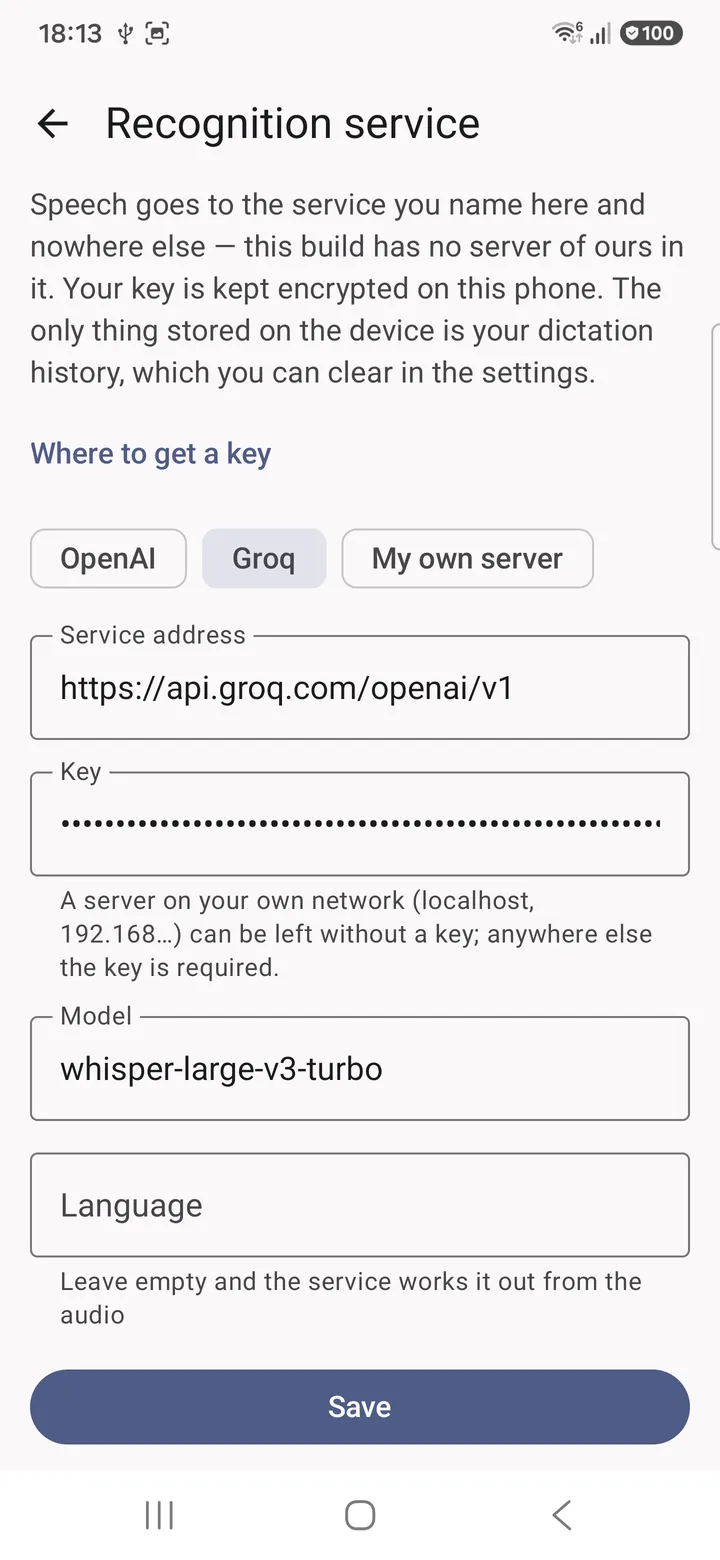
Then press Save and Test connection. "The connection works" means the chain is complete and you can dictate. The install steps and the rest of the settings are on the VoiceBoard open build page.
What breaks, in the order it usually breaks
- The computer went to sleep. The commonest cause by a distance, and the symptom is dictation that worked all morning and stopped at lunch. Keep the machine awake, or accept that dictation works when the computer does.
- The firewall. A fresh docker container publishes its port; the operating system in front of it may still refuse connections from other devices until the port is allowed.
- The address changed. Home routers hand out addresses by DHCP and take them back, so the
192.168.x.xyou typed last month may now belong to a television. Reserve the address in the router, or expect to retype it. - A VPN on the phone. With a tunnel up, the phone is no longer on your home network as far as routing is concerned, and the local address becomes unreachable.
Where a home server loses to the cloud
Three losses, and none of them is a detail. Speed: Groq answers a short dictation in a fraction of the time a home machine takes, and its own documentation puts the fast model at 216 times real time. Comfort: a laptop transcribing is a laptop with the fan on and the battery draining, and the computer has to stay awake for the phone to reach it. Accuracy: the model that fits in your memory is usually smaller than the one a service runs, and smaller models get names and terms wrong more often.
What you get in exchange is the whole point: the recording never leaves the flat, there is no key, no account and no per-hour price. If that trade sounds wrong for daily use but right for sensitive material, keep both configured and switch between them; the presets in Recognition service exist for that. If the audio may leave the building after all, the Whisper API pricing page has the two cloud routes with their real costs. And if you want dictation on the computer itself rather than on the phone, our review of open source dictation covers twelve projects licence by licence.
Frequently asked questions
Can I run Whisper on a computer without a graphics card?
Yes. LocalAI runs on the processor, and Speaches publishes a processor image alongside the CUDA one. It will be slower, and the smaller models are the practical choice: tiny and base need about 1 GB, small about 2 GB, against about 10 GB for large.
Which local server works with an OpenAI client without changes?
Speaches and LocalAI both answer on /v1/audio/transcriptions natively, on ports 8000 and 8080. whisper.cpp does not: its server serves /inference until you pass --inference-path, and it also stays bound to 127.0.0.1 until you pass --host.
What address do I type into the keyboard?
The computer's address on your home network, the server's port, and the /v1 tail: http://192.168.1.42:8000/v1 for Speaches, port 8080 for the other two. Not localhost, which on a phone means the phone.
Do I need a key for my own server?
No. VoiceBoard allows an empty Key for addresses on your own network, and those are the same addresses for which it accepts plain http. Anywhere else both a key and https are required.
Is a local server private in a way the cloud is not?
In one specific sense, yes: the recording goes to a machine you own, over your own network, and no third party's policy applies to it. That is a statement about where the audio travels, not about the security of your home network, and the keyboard's part of it is simple: it sends the audio to the one address you typed and nowhere else.
Server up, phone next
Install the keyboard, choose the preset My own server, type the address with its /v1 tail and press Test connection.