Typeless App: Can the Free Plan Cover Your Writing?
Your work email is open, and you know what you want to say. What if you could just speak instead of typing? Try one message with the Typeless app, then check whether its free allowance covers your usual week.
Typeless for desktop turns spoken thoughts into polished text in the field you already have open. Free has a weekly word limit. Pro costs $30 a month or $144 a year, equivalent to $12 a month when billed yearly.


Start with one email on your Mac or Windows PC. Download the desktop app to try it for free.

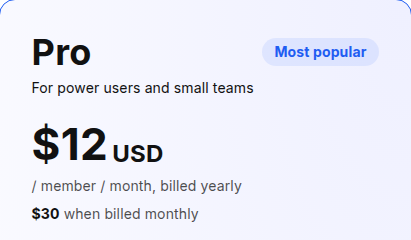
Source: Typeless pricing. Annual billing means paying $144 for the year, equivalent to $12 a month.
What happens when you change your mind mid-sentence?
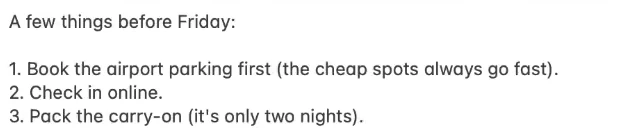
If you correct yourself while speaking, will the correction end up in your email too? Watch the official demo: a few things to get ready before Friday.
The speaker mentions checking in online, packing a large suitcase, and booking airport parking. Then they move parking to the top and change the luggage to a carry-on. The text field ends up with three items that reflect those changes.
There is also a personal dictionary for your own terms, plus translation.
Now try the same flow in your own email. You can check how your usual words come through for free.
How do you try it in your usual text field?
Use Typeless where you want to write. Set up dictation first, then put the cursor in your email's text field before speaking.
1. Get ready to dictate
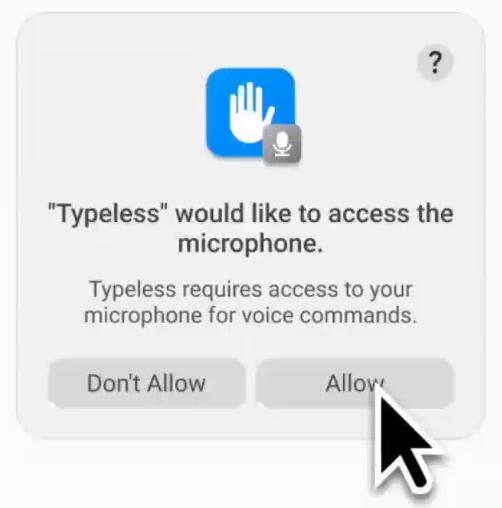
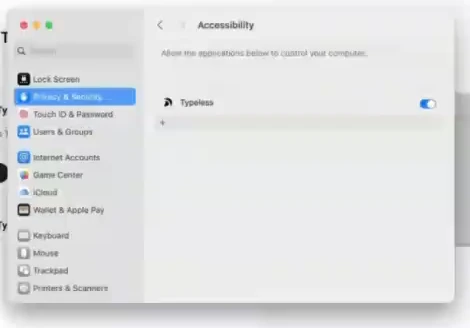
Download the desktop app and sign in with Google, Apple, or email. Allow microphone access. On a Mac, also allow Accessibility so Typeless can insert text.
To change these permissions manually, open System Settings → Privacy & Security → Microphone or Accessibility, then turn on Typeless.
2. Speak into an email
Press Fn once on Mac or Right Alt on Windows, speak, then press it again to stop. You can change the shortcut in Settings.
For US English, open Settings, then under Language choose Select language variants and select your preferred English variant.
Try saying this aloud.
Check that the text says Monday at 3 p.m. and keeps Taylor as the recipient. Next, add a term you use at work. Check that the meaning and names still match what you meant.
Your audio and limited context, such as text in the active field, are processed in the cloud. You need an internet connection. For work messages, choose content your company allows you to use with the service.
How many more messages fit in the free allowance?
Once you have dictated one message, check whether Free covers your weekly emails. The current public pricing page does not give a numeric free limit. Use the weekly limit and usage shown in your own app.
Your typical message gives you a useful measure: how much does the usage counter increase when you dictate it?
Calculate it from one of your messages
Note your usage, dictate one message of your usual length, then check usage again. Enter values from the same week. If the weekly counter resets in between, start again.
This is an estimate for messages of similar length. Your numbers are calculated on this page and are not sent anywhere.
Compare the amount you need each week with your limit. If it fits, you can keep using Free.
If you need Pro, which payment option fits?
If Free is not enough and you like the finished text, think about how long you will use Pro. Monthly and annual billing have different upfront costs.
| Plan | What you pay | Word allowance | Accuracy and access |
|---|---|---|---|
| Free | $0 | Weekly limit | Standard accuracy |
| Pro, monthly | $30 each month | Unlimited | Enhanced accuracy and priority access, according to Typeless |
| Pro, yearly | $144 paid yearly, equivalent to $12 a month | Unlimited | Enhanced accuracy and priority access, according to Typeless |
What is the total if you choose now?
- 4 months: $120 with monthly billing, or $144 for a year.
- 5 months: $150 with monthly billing, or $144 for a year.
For a short stretch, monthly billing costs less. If you expect to use Pro for at least 5 months from the start, annual billing costs less in total.
First, try your own message and check both the finished text and the free allowance it uses. Once you know how much you need, choose Pro through Upgrade in the desktop app.
Comments
No comments yet. Ask a question or share what worked for you.