
Mac Speech to Text: 10 Dictation Apps, Real Prices, and When the Free One Is Enough
The best paid dictation app for most Mac users is Wispr Flow, because it writes clean text in any app and costs $12 to $15 a month. The best free option is the Apple Dictation already sitting in your System Settings, and for a lot of people it is the end of the story rather than the beginning. We compared 10 tools below, and every price on this page was read off the vendor's own site on 27 August 2026.
Wispr Flow is the best paid dictation app for most Mac users: it writes finished, punctuated text into whatever app you are already in, and costs $12 a month billed yearly. Its free tier is 2,000 words a week, which is enough to find out whether you need it.
Try Apple Dictation first. It is free, it has no word limit, and for messages and short notes it is often all you need.
Our picks
Five roles, one tool each. All 10 apps, priced side by side, are in the At a glance table further down.
| Role | Tool | Price today |
|---|---|---|
| Best for most people who write all day | Wispr Flow | free tier, then $12/mo billed yearly |
| Best free starting point | Apple Dictation | free, built into macOS |
| Best if your audio must stay on your Mac | VoiceInk | $29 once |
| Best if you also use Windows or Linux | Voicy | $8.49/mo, or $260 once |
| Best for hands-free control, not just typing | Apple Voice Control | free, built into macOS |
Start here: when Apple Dictation is already enough
Nobody in this category wants to tell you this, so we will. Apple's built-in dictation is free, it works in every text field on the Mac, and on Apple silicon it runs on the machine itself. Apple's own guide says you can "dictate text of any length without a timeout", and that it stops on its own after 30 seconds of silence (Apple Support).
Apple Dictation may already be all you need if all of the following are true:
- you dictate messages, notes and short emails rather than long documents;
- your vocabulary is ordinary English, not medical terms, code identifiers or unusual names;
- you are fine adding punctuation by voice ("comma", "new paragraph") or fixing it afterwards;
- you speak one language at a time and switch rarely.
On Hacker News in May 2026, a developer wrote that macOS dictation is "actually pretty dang good" bound to a double tap of the fn key, and in July another asked what a paid app even adds because "normal thing works great". They are not wrong. macOS Tahoe 26 pushed more of the speech recognition onto the Neural Engine, so the built-in tool got quietly better in the last year (Apple newsroom).
Here is the other side. Paid tools exist because Apple's dictation gives you raw speech: your filler words, your restarts, your "um". It has no idea that you are writing a Slack message and not a legal memo. It struggles with jargon, and people who dictate for a living report dropped words with no sign anything was lost. In December 2025 a Hacker News commenter put it plainly: running Whisper models locally gives "dramatically better output" than the native engine. If you recognise yourself in that, keep reading.
At a glance
| Tool | Best for | Price (27 Aug 2026) | Payment | Where audio is processed | Runs on |
|---|---|---|---|---|---|
| Apple Dictation | short notes and messages | Free | included in macOS | on device (Apple silicon) | any Mac |
| Wispr Flow | all-day writing across apps | Free 2,000 words/week; Pro $15/mo, $12/mo yearly | subscription | cloud | macOS 12+, Intel or Apple silicon |
| VoiceInk | privacy and no subscription | $29 / $49 / $69 for 1 / 2 / 3 Macs | one-time | on device | Apple silicon only, macOS 14.4+; free iPhone app since April 2026 |
| Superwhisper | picking your own models | Free tier; Pro $8.49/mo | subscription or lifetime | on device or cloud, your choice | Mac (local models need Apple silicon) |
| Voicy | Mac plus Windows plus Linux | 30 free minutes; $8.49/mo; $260 lifetime | subscription or lifetime | cloud | Mac, Windows, Linux, Chrome |
| MacWhisper | turning recordings into text | Free; Pro €64 | one-time | on device | Mac |
| Aqua Voice | text that appears as you speak | 1,000 free words; $8/mo yearly | subscription | cloud | macOS, iOS, Windows |
| Spokenly | free local dictation with options | Free; Pro from $9.99/mo | free or subscription | on device, cloud with your own key | Mac, iOS, Windows, Linux |
| Speechnotes | a one-off job in the browser | Free; Premium $1.90/mo | free or subscription | cloud | Chrome |
| Apple Voice Control | commands and editing by voice | Free | included in macOS | on device | any Mac |
The tools
Apple Dictation: best free starting point
It is already installed. Open System Settings, go to Keyboard, switch Dictation on, pick a language and a shortcut, then press that shortcut in any text field. There is nothing to buy and nothing to sign up for.
- works everywhere, including apps that block third-party tools;
- on Apple silicon it does not need the internet for most languages;
- no word limit and no account.
- the text comes out exactly as you said it, filler words included;
- punctuation has to be spoken or fixed later;
- technical vocabulary is a coin flip;
- it mutes other audio while it listens, which is a repeated user complaint if you dictate while something plays.
Cost: free. Apple's setup guide is two paragraphs long, so trying it costs you five minutes.
Wispr Flow: best for people who write all day
This is the one we recommend to most people who have already decided the built-in tool is not enough. You hold a hotkey, talk in whatever mess your brain produces, release, and finished text lands in the field you were in. Not a transcript of your speech: an edited version, with your "wait, scratch that" removed and punctuation where it belongs. Emails come out as emails. Slack messages come out as Slack messages. That difference is the whole product, and it is why people who dictate for hours keep paying for it.
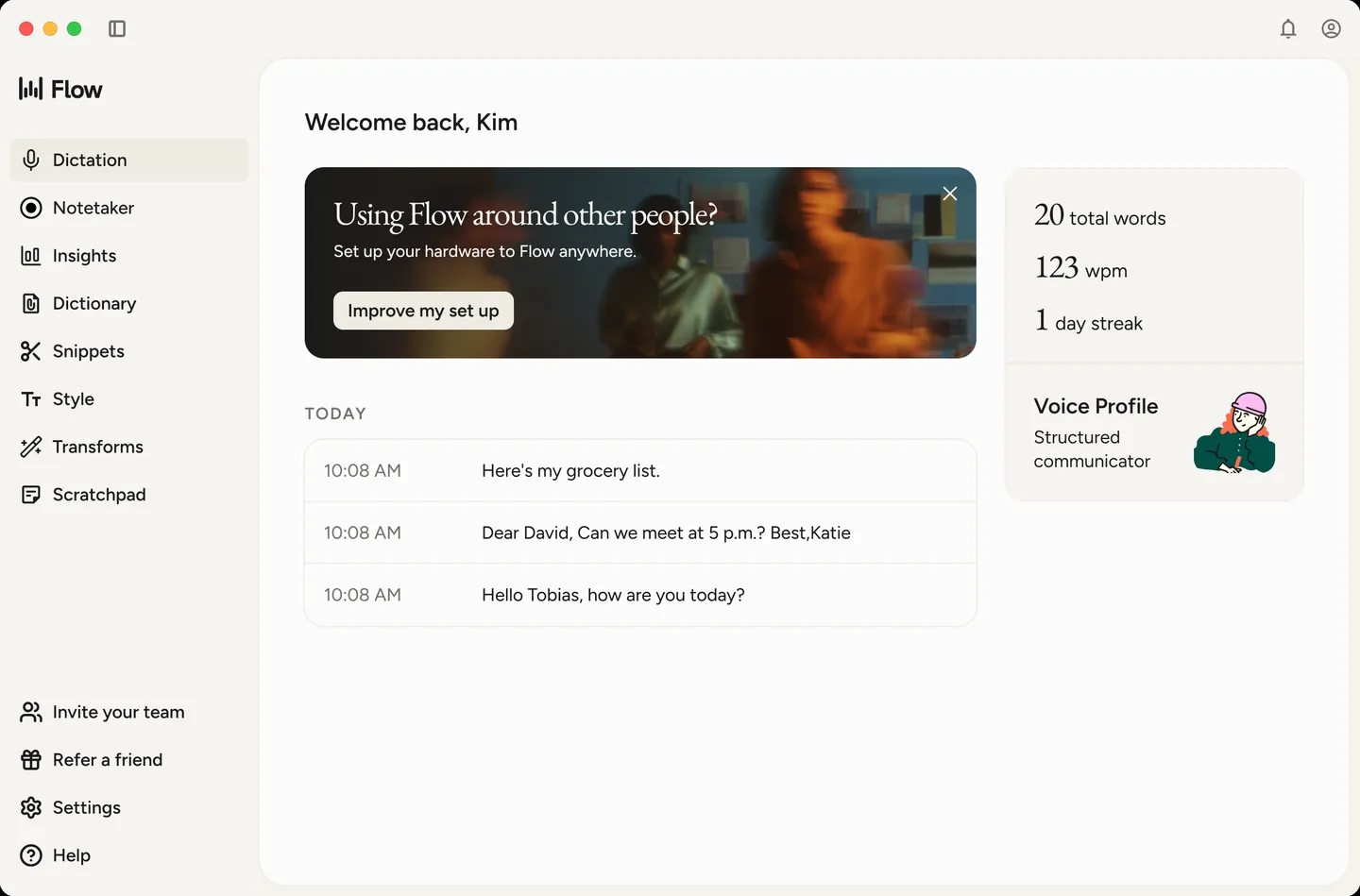
It works in Gmail, Notion, Word, terminals, code editors and AI chats without plugins, in 100+ languages with automatic detection. The vendor claims 220 words per minute against 45 typed. Zachary Proser, a developer who used four apps for a working week in March 2026, measured 184 wpm for himself and rated it the best of the four (his write-up).
Now the honest part. Everything you say goes to Wispr's servers, and there is no offline mode at any price. Their own documentation rules out iPad, Linux, Chromebooks, and, importantly, "virtual machines or remote desktop environments" (system requirements). If your work lives inside a remote desktop, this app will not help you, and neither will most of its competitors: as one Hacker News commenter noted in August 2026, apps that paste a finished block of text simply do not reach into that window.
Price: free plan gives 2,000 words a week on desktop and 1,000 a week on iPhone. Pro is $15 a month, or $12 a month billed annually, and students and educators get 50% off (pricing). Requirements are gentle: macOS 12 or later, Intel or Apple silicon.
Deeper look: our full Wispr Flow review. Weighing it against similar tools: the alternatives worth comparing. Same question on the other platform: best dictation software for Windows.
VoiceInk: best when the audio must not leave your Mac
Some people cannot use a cloud dictation tool at all. Lawyers under NDA, clinicians, anyone handling other people's confidential material. VoiceInk is built for exactly that: transcription runs on the Neural Engine of your own Mac, and the vendor states plainly that "your voice data never leaves your Mac". Cloud models are available only if you plug in your own API key and decide you want them.
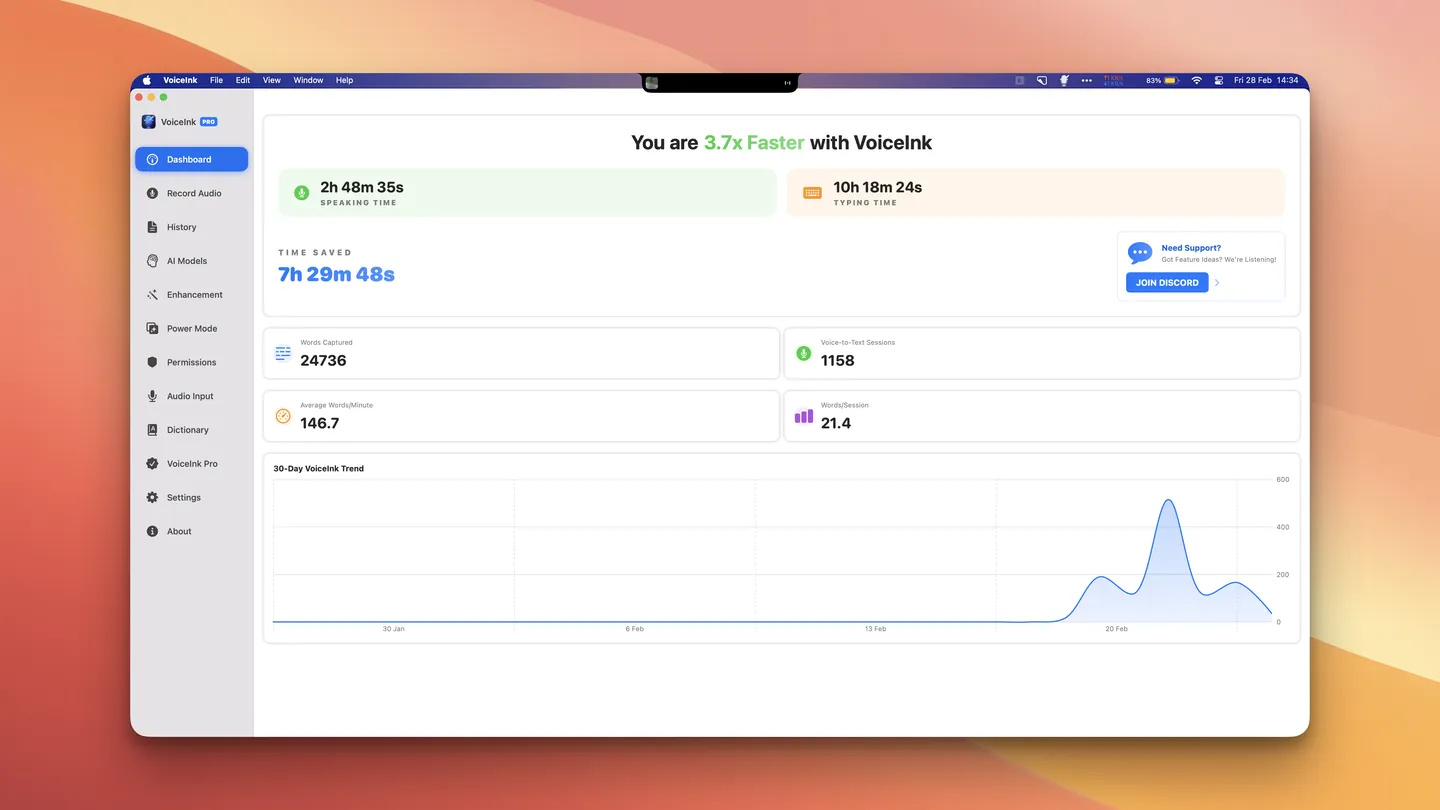
The second reason people choose it has nothing to do with privacy. You pay once. $29 for one Mac, $49 for two, $69 for three, with lifetime updates and a 14-day refund (pricing). Against a $144-a-year subscription, it pays for itself in about three months. The code is open under GPL-3.0 with 6,100 stars on GitHub, and you can compile it yourself for nothing if you are comfortable with Xcode.
The catch is hard and it is worth repeating, because no other roundup mentions it: VoiceInk runs on Apple silicon only, macOS 14.4 or later. If you are on a 2019 Intel MacBook, this app is not for you, full stop. Since April 2026 there is also a free iPhone app, useful as a companion but behind the Mac version. Local models also need RAM (8 GB recommended) and the first download of a model takes a while. And because everything happens locally, you do not get the server-side polish that Wispr Flow applies to your text unless you configure it yourself, though the 2.11 release of 12 August 2026 added a built-in "VoiceInk Refine" that tidies the transcript on the device. Details in our VoiceInk review.
Superwhisper: best for people who want to choose the model
Superwhisper is the power user's pick, and it has the most generous free tier in this list: unlimited use of Whisper models, 100+ languages, meeting recording, all at $0. You can run everything offline, or point it at GPT-5, Claude or Llama for cleanup, or mix the two depending on the mode you are in.
Pro adds custom API keys, unlimited cloud and local models, translation and file transcription, at $8.49 a month; the yearly plan gives two months free and there is a lifetime licence as well. Students get 40% off, and every plan carries a 30-day refund window.
Worth knowing before you install: the vendor says offline models "only run really well on Apple Silicon macs" and that "Intel Macs work best with Cloud models". So on an older machine the privacy argument evaporates. The other thing is temperament. Superwhisper hands you modes, prompts and model choices, which is wonderful if you enjoy that and tiring if you do not. A widely read comparison from September 2025 split this market into apps that "take over completely" and apps "built for users who like to be in control", and put Superwhisper firmly in the second group (A Fading Thought).
Voicy: best if your day is not only on a Mac
Voicy is the answer to a question the rest of this list mostly ignores: what if you also sit at a Windows machine, or a Linux box, or live in Chrome? It ships desktop apps for macOS, Windows and Linux (deb, rpm, AppImage), a browser extension, and mobile apps, all under one licence, and it types into roughly anything: Gmail, Docs, Word, Outlook, Slack, ChatGPT, Claude, terminals.
Their claim is 99%+ accuracy across 50+ languages, and on privacy they state that recordings and transcripts are not stored at all and are never used to train models. That is a policy, not a technical guarantee, since processing does happen in the cloud and there is no offline mode.
Pricing is friendlier than the Mac-only crowd: 30 minutes of free recording without a card, then $8.49 a month with 20% off annually (around $82 a year), a $260 lifetime option, and $6.79 per seat for teams of three or more (pricing). For a Linux user this is close to the only serious option on the market.
MacWhisper: best for turning recordings into text
Different job, same category, and it gets confused with the others constantly. MacWhisper is first of all a transcription app: you drop in an mp3, an mp4, a YouTube URL or a meeting recording, and it gives you text with speakers separated, locally, in about 100 languages. System-wide dictation is in there too, including in the free version, and Pro upgrades it to the higher-quality models.
The free tier is genuinely useful rather than a teaser. Pro is €64 as a one-time licence with lifetime updates (macwhisper.com). If your problem is a folder of interviews rather than a blank email, this is the tool, and it costs less than a year of anything with a subscription.
Not the right pick if you want polished writing typed into apps all day. It transcribes what was said; it is not trying to rewrite you.
Aqua Voice: best when you want to see the words as you speak
Most dictation apps make you talk, stop, then wait a beat while text appears. Aqua streams it, so words show up mid-sentence. That sounds cosmetic until you use it, because you can catch a mistake without breaking your train of thought. The vendor claims 230 words per minute and 97.3% accuracy on the AISpeak benchmark, which is their number, not ours.
Free gets you 1,000 words. Pro is $8 a month billed annually ($10 month to month), Max is $24 a month for realtime mode ($30 monthly), and Team is $12 per user (pricing). It runs on macOS, iOS and Windows, in the cloud, with a Privacy Mode that stores nothing on their servers.
The free allowance is the smallest here by a wide margin: 1,000 words is about two long emails.
Spokenly: best free alternative to Apple's built-in dictation
If Apple Dictation is not accurate enough but you refuse to pay a subscription, look here before you look anywhere else. Spokenly gives unlimited local transcription on Whisper and Parakeet models for free, running on your Mac, in 100+ languages. Cloud models from OpenAI, Deepgram, Groq, Anthropic and Google are available if you bring your own API key, which means you pay cents to a provider instead of $10 a month to an app. Pro features start at $9.99 a month, and one subscription covers Mac and iPhone. It also runs on Windows and Linux.
Local models want Apple silicon to be quick, and a free product from a small team carries the usual risk about how long it stays free and supported.
Speechnotes: best for a one-off job in the browser
No installation, no account. Open the page in Chrome, click the microphone, talk, copy the text out. That is the entire product, and for someone who needs to dictate one letter this afternoon it beats evaluating nine apps.
It only works in Chrome, only in its own editor (a browser extension covers other sites), and it needs the internet. Premium at $1.90 a month removes ads; file transcription is $0.10 a minute. Fine for a task, wrong for a habit.
Apple Voice Control: best for hands-free control and correction
This is the one missing from every other roundup, and it matters most to the people with the least choice. Voice Control is not a dictation app. It is a macOS accessibility feature that lets you run the whole machine by voice: "open Safari", "click Send", "select the last three words", "replace that with". It includes dictation, and it has something no AI dictation app on this list offers, which is editing and correcting by voice instead of by keyboard.
Users who moved from Dragon keep saying that modern dictation apps lost this. In April 2026 a Hacker News commenter compared Superwhisper and Handy to old Dragon software and complained about exactly that gap: the new apps assume a working pair of hands. If yours are injured, or you have RSI, or you cannot use a keyboard at all, start with Voice Control in System Settings under Accessibility, not with a $15 subscription.
One caveat from Apple's own documentation: while Voice Control is on, standard macOS Dictation is unavailable (Apple Support). The two are alternatives, not layers.
How we compared
We are going to be straight about method, because half this category is not.
We did not run a laboratory accuracy test, and we do not publish word error rates of our own. What we did instead: opened every vendor's own pricing, documentation and requirements pages on 27 August 2026, and recorded five things for each tool.
- Price and payment model. The number in dollars or euros as displayed that day, plus whether it recurs. A subscription and a one-time purchase are not comparable until you decide how long you will keep using the thing.
- Where the audio goes. On your Mac, to a vendor's servers, or your choice. This is the line that decides the question for anyone under an NDA.
- Hardware and environment gates. Apple silicon requirements, minimum macOS, and documented cases where an app does not work at all, such as remote desktops.
- The shape of the work. Typing into any app, transcribing files, or controlling the machine. These get lumped together in roundups and they are three different products.
- What the free tier actually gives you. Words per week, minutes, or nothing.
For opinion rather than specification, we read dated public discussions rather than testimonials on vendor pages, mostly Hacker News threads from late 2025 through August 2026, and we quote them with their dates so you can judge how stale they are.
What this method cannot tell you: which app is most accurate on your voice, your accent and your vocabulary. Nobody's roundup can, including the ones that publish a single tester's word-per-minute score. Every paid tool here has a free tier or a refund window, so the last step belongs to you and takes an afternoon.
Prices in this category move. If you are reading this months after the date at the top, check the vendor's page before you buy.
The competition
Products we looked at and did not put in the main list, with the reason.
Dragon. The one everybody still asks about. Dragon Professional Individual for Mac reached end of sale and end of support on 22 October 2018, and Dragon Anywhere stopped selling and renewing on 1 July 2026. Nuance belongs to Microsoft now and has shown no sign of coming back to macOS. Listicles that still quote $699 for Dragon on a Mac are quoting a product you cannot buy. The full story: what happened to Dragon and what replaces it.
Willow Voice. A capable cloud dictation app at $12 a month billed annually, with 2,000 free words a week. It sits in the same price bracket and the same cloud model as Wispr Flow while covering fewer platforms, so we could not name a case where it is the better buy.
Voibe. Mac and Windows, $7.50 a month, $59 a year or $149 once, with a 7-day trial and a 30-day refund. Worth a look if you want a lifetime licence cheaper than Voicy's, though its site does not spell out chip requirements or where Mac processing happens, and we do not print what a vendor does not state.
Otter.ai and Notta. Excellent at meetings, wrong category here. They record and summarise conversations; they do not type into the app you are working in. If that is your actual problem, see the tools for transcribing interviews and lectures.
Google Docs voice typing. Free and decent, but it lives inside Google Docs in Chrome and nowhere else. If that is your whole workflow, it may be enough on its own.
Setapp bundle apps (WhisperTranscribe, MurmurType and friends). Reasonable tools that only make financial sense if you already pay for Setapp for other reasons.
whisper.cpp, Handy and other do-it-yourself setups. Free, private, and as polished as you make them. If you are happy wiring a hotkey to a local model, you can have most of VoiceInk for $0 and an evening. Which of those projects are actually maintained is a separate question, and we answered it in open source dictation, project by project.
What to do next
If you recognised yourself in the first list, start with what is already there: turn on Apple Dictation and give it a week.
If you did not, the choice is short. Audio that cannot leave your machine, and you are on Apple silicon: VoiceInk for $29 once. A Mac plus a Windows or Linux machine: Voicy. Everyone else who writes for a living: start on the free tier of Wispr Flow and see whether 2,000 words a week runs out. If it does, you have your answer about whether it is worth $12 a month.
Comments
No comments yet. Ask a question or share what worked for you.