
Dragon NaturallySpeaking: What Happened, and What to Use Instead (2026)
Dragon has not been switched off, and nobody at Microsoft has announced its death. What happened is quieter, and for the people who depended on it, worse. The consumer path was taken apart one piece at a time over eight years.
The Mac version was discontinued in 2018. The affordable home edition was pulled in February 2023 and never got a version 16. The Nuance online store stopped taking orders in 2025 and never came back. Dragon Anywhere Mobile stopped being sold on 1 July 2026. What is left is a Windows program that resellers still stock for about $699, a product page with no price and a "Contact us" button where the cart used to be, and a brand that now lives in hospitals.
We checked all of this at the source on 27 August 2026, including the archived version of the store, and every claim below points at the document it came from.
Three different people arrive at this page. If you already own a licence, the part about activation is the one that matters, and it is the part nobody else has written. If you were about to buy, read the timeline. If Dragon was not a convenience for you but the way you use a computer, go to the section on voice control, where we say plainly what has no replacement.
- The name NaturallySpeaking was retired in 2015. Version 13, in 2014, was the last release to carry it. The current desktop product is Dragon Professional v16.
- Dragon for Mac ended on 22 October 2018. There has been no Mac version since.
- Dragon Home, the affordable edition, ended on 27 February 2023 along with the whole v15 line. Version 16 shipped the next day without a home edition. That is the date the consumer product really died.
- The Nuance store stopped selling during 2025. It has never reopened.
- Dragon Anywhere Mobile stopped being sold on 1 July 2026. Existing subscriptions cannot be renewed.
- Dragon Professional v16 is still sold, by resellers, at around $699, and Dragon Legal at around $799. Nuance itself publishes no price.
Nothing has been announced as end of life. There is no published support cut-off date for v16. Microsoft has said nothing at all about the desktop product in four and a half years of owning it, and that silence is the clearest signal in this whole story.
What actually happened, with dates
April 1997. Dragon NaturallySpeaking 1.0 arrives, the first program that lets you speak in ordinary sentences rather than pausing after every single word. For the next two decades it has no serious rival on Windows.
August 2014. Version 13 ships. It is the last one sold under the NaturallySpeaking name. From version 14 in 2015 the product is called Dragon Professional Individual, which is why searching for the old name today turns up so much confusion.
22 October 2018. Nuance discontinues Dragon Professional Individual for Mac. Its own notice, still online today, is blunt: "Dragon Professional Individual for Mac is being discontinued effective 10/22/2018 and will no longer be available for purchase," and "Nuance will no longer provide updates for the Software after 10/22/2018." Phone support runs for 90 days from activation in North America, 180 days elsewhere. Owners keep a perpetual licence and may keep using it. On the Mac forums that week, people who had bought every single version since MacSpeech were working out how to keep an old macOS on a spare partition so their software would still run.
12 April 2021. Microsoft announces it is buying Nuance for $56.00 a share, about $19.7 billion including net debt. Read the press release with the desktop product in mind and one thing jumps out. The Dragon products named in it are Dragon Ambient eXperience, Dragon Medical One and PowerScribe One. Dragon on your desk is not mentioned once. When the deal closed on 4 March 2022, the announcement did not use the word Dragon at all.
27 February 2023. This is the day that matters most and the one almost nobody writes about. A Nuance product advisory ends sales of the entire v15 line: "Dragon Professional Individual 15, Dragon Professional Group 15, Dragon Legal Individual 15, Dragon Legal Group 15, Dragon Law Enforcement 15, and Dragon Home 15 will no longer be available for purchase after February 27, 2023." Support for v14 ended on 1 September 2023. The same document reassures perpetual licence holders that "Nuance is not taking any specific action to make your Dragon solution any less usable."
28 February 2023. Version 16 ships, optimised for Windows 11. There is no Dragon Home 16. There never has been. The cheap edition that put professional dictation in ordinary houses simply did not get a successor.
10 January 2024. Version 16.1 arrives. Its release notes list 64-bit LibreOffice support, bug fixes, security enhancements and general stability. Not one new feature. That is the entire development output of the last three and a half years.
3 March 2025. Microsoft launches Dragon Copilot, which merges Dragon Medical One with DAX Copilot. It reaches general availability in the United States on 1 May 2025. The Dragon brand is thriving. It is thriving in clinical documentation, sold to health systems, and it has nothing to do with the person at home with a headset.
1 July 2026. Dragon Anywhere Mobile stops being sold. The Google Play listing, updated by Nuance on 26 June 2026, now opens with "Subscriptions to Dragon Anywhere Mobile are no longer available for purchase," and the release notes say: "As of July 1, 2026, Dragon Anywhere Mobile is no longer available for sale. Purchasing new subscriptions and renewing existing subscriptions is no longer possible."
Why the store disappeared
Every roundup you will read quotes $699 as Dragon's price. Almost none of them mention that you cannot pay Nuance that $699, because there is nowhere to pay it. We went looking for when the shop closed, and the Internet Archive answered it.
A snapshot of the Nuance store from 18 May 2025 carries a banner across the top of the Dragon Professional purchase page:
Nuance store purchases are temporarily on hold while we switch to a new payment platform. You can contact us for alternative ways to purchase or volume enquiries.
Look at the page source of that same archived page and you find the store's own analytics tag identifying its platform: site_cms: 'Digital River'.
Digital River ran e-commerce for a long list of software companies, and it collapsed. It had been missing payments to merchants since mid 2024, filed for insolvency for its German subsidiaries in late January 2025, laid off staff and wound down. So the most likely reading of that banner is simple: the company that processed Nuance's payments went under, the shop went dark, and somebody wrote "temporarily" because at the time they meant it.
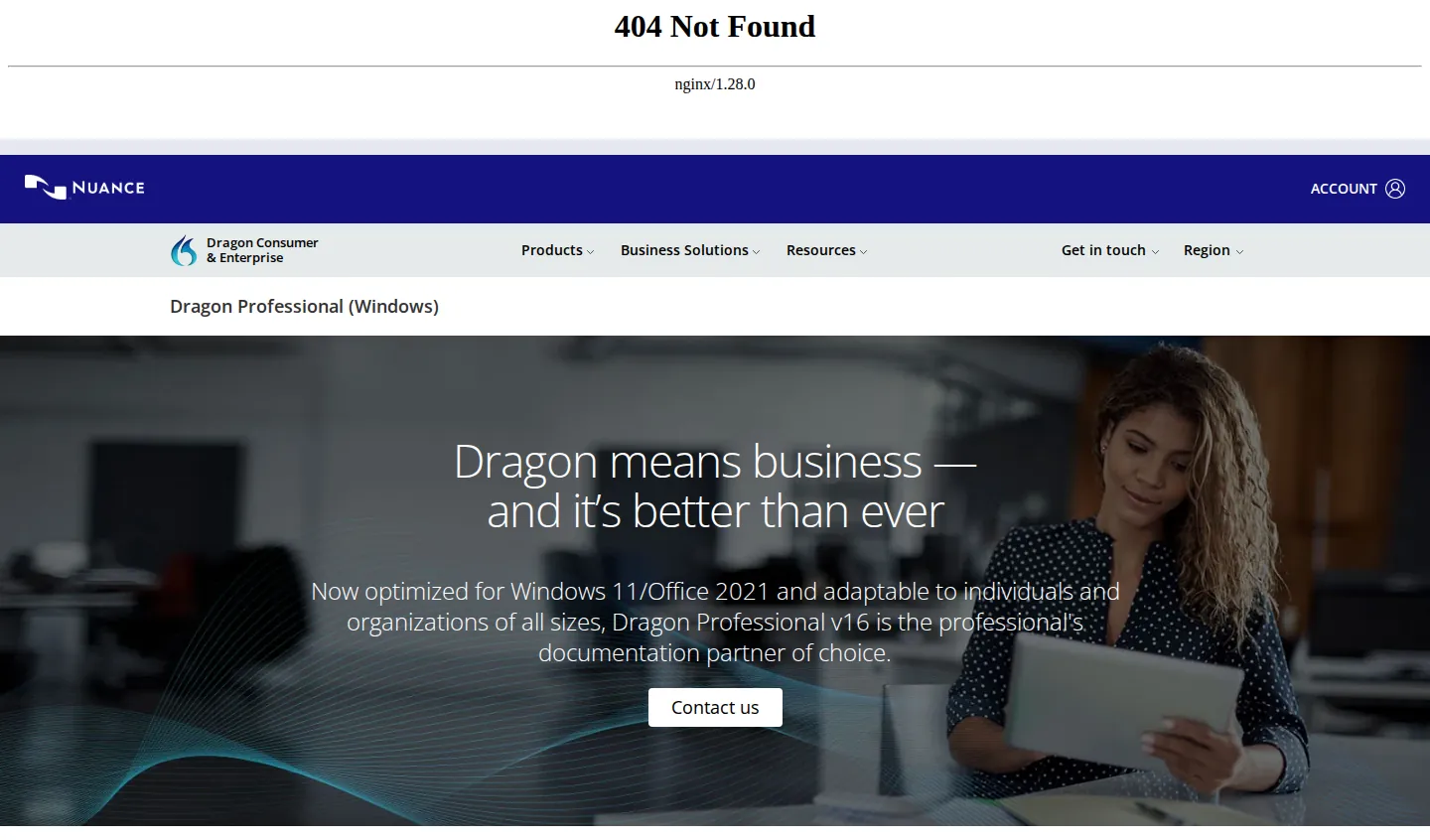
That is our inference, not a Nuance statement, and we flag it as such. The verifiable part is the part that matters anyway. "Temporarily" has now lasted more than fifteen months. Today shop.nuance.com bounces to a marketing page and the store URLs beneath it return 404. Choosing not to rebuild a shop for fifteen months is not an accident. It is a decision about how much a product is worth.
Meanwhile the shop window still advertises things you cannot get. The Dragon Professional page invites you to "Extend your enterprise-wide documentation capabilities with our professional-grade mobile dictation app," linking to Dragon Anywhere Mobile, which has not been for sale since July. The Dragon Anywhere Mobile page still lists step one as "Purchase your Dragon Anywhere Mobile subscription and set up your user account." The accessibility page still calls Dragon "the perfect accessibility solution" for "people with physical disabilities that make typing difficult or impossible," with a "Contact us" button and no price. And the support pages still send you for training to "the Dragon NaturallySpeaking Value-Added Reseller community," using a product name last sold in 2015.
If you own a Dragon licence, this is the part to read
Good news first. Your copy keeps working, and the infrastructure around it is not dead. On 27 August 2026 the knowledge base at nuance.custhelp.com is live and its newest Dragon articles are from October 2025. The support numbers are still published: customer service on (800) 654-1187 for "Product/Sales Inquiries, Activation, Licensing, Registration and Returns," technical support on 1-857-214-6311, both Monday to Friday, 9am to 8pm Eastern. Microsoft even hosts a "Learn Dragon Professional" section on its own support site with lessons for v16, including one called "Correct that." And the 2023 advisory said explicitly that Nuance is doing nothing to make existing installations less usable.
Now the parts that should make you act this week rather than next year.
Activation is mandatory, and it is a server on the internet. The official documentation for Dragon 16.1 says: "The first time you start Dragon 16.1, you are prompted to activate the product. If you skip activation, you can launch Dragon in Trial mode five times." A copy you cannot activate is a copy you cannot use. Nuance itself acknowledged trouble here in a knowledge base article first published on 14 July 2025 and updated that October: users of Dragon 15 Home and Dragon Professional Individual v15 "may experience an issue activating their software," with manual activation offered as the workaround.
Write down the manual activation address now: licenses.nuance.com/act/us. It is live, it asks for your serial number and your machine fingerprint, and a Nuance article from 30 October 2025 confirms it covers v14, v15 and v16 including Professional, Legal, Law Enforcement and volume licences. The page footer still says "© 2002-2015." Nobody has promised how long it stays up.
Deactivate before you wipe anything. Long-time Dragon users on the specialist forums have the same advice, and it is worth following: uninstall Dragon while you are still online, so the activation goes back to your count, before you reset a PC or move to a new machine. Copy your user profile out too, the folder at %HOMEPATH%\AppData\Local\Nuance\NS16\Users. Years of vocabulary training live there.
Keep your installer, because there is no download page. We could not find any public link where a licence holder can download Dragon today. Here is what that looks like in practice. On 18 January 2026, on Microsoft's own Q&A site, a man wrote: "I have a license for Nuance. I did a factory reset of my pc several weeks ago, but since then I have not been able to reinstall the system." The automated answer told him to download the software from the Nuance website. He replied, "I do not have a link for the downloading of the software," and then asked again: "Please provide a link for downloading the software." No link ever came. He had paid for the product. He simply could not get it back.
Lost your serial? There is one route, and it is a phone call. The knowledge base says to contact support with proof of purchase, on 1-800-654-1187 in the United States or +1-978-977-2452 internationally, and they issue a replacement. The self-service path ran through the online store, and the online store is gone.
Whether that call helps is another matter. On 23 August 2026 a user on the KnowBrainer dictation forum described exactly this situation. He had bought a new Windows 11 machine in July, could not find his v15 serial, and contacted Dragon support. What came back, in his words, was "a sales pitch stating that my v15 would not work in Win11, but I could upgrade for the discounted price of 'only' $397." He adds, plainly: "I am disabled so I have to watch my finances." He went looking through email instead, found a message from four and a half years earlier that contained the serial, and installed v15 on Windows 11, where it ran. Dig out your serial number today, while you still have the option of finding it calmly.
Be careful where you buy. This is the part that worries us most, and it follows directly from Nuance having no shop. Search for somewhere to buy Dragon and you will find sites that look like an official Dragon store and are not. Lunis Orcutt, who moderates that forum and runs one of the longest-established Dragon reseller businesses, warned on 25 August 2026 that an inflated quote is itself a signal: the 16.1 upgrade is minimum-advertised-priced at $349, so if you are being asked $397, check very carefully who you are talking to. He names specific lookalike domains as ones to avoid. In the same post he makes a claim we cannot verify but which is worth hearing from someone that close to the business: "With the exception of the medical division, the rest of Nuance was fired."
One more thing worth knowing if you are weighing a purchase. A perpetual desktop licence keeps working by design. The cloud editions do not: Nuance's own release documentation for Dragon Professional Anywhere sets support at 12 months from release, limited support for another six, and end of life at 24 months, at which point that version stops working. Buying a box and renting a service age very differently, and this product line demonstrates both.
So, this week, in order. Dig out your serial number and store it somewhere that is not only your inbox. Write down the manual activation address. Copy the installer and your user profile onto a drive that is not this machine. Then do the one thing that costs nothing and that people skip: set up a fallback while you still have a working Dragon to fall back from. Press Win+H once so you know the free built-in dictation is there, and put a free tier next to it, because the morning the activation server refuses you is the wrong morning to start choosing software. Wispr Flow gives 2,000 words a week free on the desktop, which is enough to keep working through a bad week, and $12 a month on the annual plan if you decide to keep it. Be clear about what that is: a replacement for Dragon's dictation, not for its voice control. If control is what you need, the section below is the honest one.
If you subscribed to Dragon Anywhere
Sales and renewals ended on 1 July 2026. Nuance has not published a date when the service itself switches off, so what you have runs until your paid term ends and then stops being renewable.
How you find that out depends on which phone you own, and this is why people are still being caught out. Open the app's version history and the shape of the ending is visible in three lines. The previous release, 1.94, came out on 5 March 2024. Then nothing for twenty-eight months. Then version 1.96 on 1 July 2026, whose release notes exist to announce the app's own death: "As of July 1, 2026, Dragon Anywhere Mobile is no longer available for sale. Purchasing new subscriptions and renewing existing subscriptions is no longer possible."
Nine days later, version 1.96.1 shipped with the note "Resolved issue with sharing documents not working as expected," and on the App Store that replaced the notice on the listing. Somebody arriving today sees the bug fix, a description that still sells the product enthusiastically, and no hint that it is over. On Google Play the sentence sits at the top of the description as well, so it survived. Tap through to the developer's website from either listing and you land on Microsoft's health solutions page, in German.
The ratings tell you how the last few years went for the people still using it: about 1.6 out of 5 from 944 ratings on Google Play, 2.6 out of 5 from 726 on the App Store. Three reviews sum up the handover better than any analysis could. On 15 April 2026: "Your help button directs me to Microsoft Healthcare, like really, come on." On 27 April 2026, someone else independently hit the same wall: "No idea how to contact customer services..the help button just sends me to a microsoft webpage?!" And on 4 January 2026, a paying subscriber wrote: "it has begun to tell me that my subscription is no longer active... Even though I have faithfully paid for this, I no longer can use it."
If you have documents in Dragon Anywhere, export them while it still runs. Your custom words and auto-texts are worth saving too, since nothing else will import them.
For the job it did, dictating long documents from a phone, the modern equivalents are the mobile sides of the desktop apps below rather than standalone products. Wispr Flow has an iPhone keyboard and an Android version, and the same account carries your dictionary across to your computer, which is the part Dragon Anywhere charged for.
What to use instead
There is no single answer, because Dragon did two different jobs and the replacements for them come from different places. Work out which one you actually need before you spend anything.
If you just want words on the screen
Start with what you already own. On Windows, press Win+H in any text box: voice typing has been built into Windows since Windows 10, it is free, it handles punctuation automatically, and for a great many people it ends the search right there. It needs an internet connection and it covers 43 languages. On a Mac or an iPhone, Apple Dictation is the equivalent, and on recent Macs it is genuinely good.
Give the free option a week of real work before you conclude it is not enough. If it keeps dropping words, stalls mid-sentence, or mangles the vocabulary of your job, then paying is worth it, and the current generation is a different experience from Dragon. There is no enrolment, no reading a training passage, no accuracy that improves over months. You hold a key, you talk, and cleaned-up text appears in whatever window you were in, with the filler words removed and the sentence you restarted turned into the sentence you meant.
Wispr Flow is the one we point most people to, and it is the closest thing to a like-for-like upgrade from Dragon's dictation side. It covers over 100 languages, one account works across Windows, Mac, iPhone and Android, it keeps a personal dictionary that learns your names and jargon as you correct it, and it has snippets, which are the nearest thing to Dragon's auto-texts. Free gives you 2,000 words a week on the desktop, Pro is $15 a month or $12 on annual billing. The fine print: Windows 10 or 11 on x64 only, so ARM laptops running Snapdragon chips are out, and it is a cloud service, so no connection means no dictation. Our full review is here, and if it is not for you we keep a list of what else fits.
If subscriptions are the thing you object to, and after twenty years of buying Dragon in a box that is a reasonable position, Voicy sells a lifetime licence at $260, works on Windows, macOS and Linux, and offers a 20% disability discount described on its pricing page as "no questions asked." It is cloud-based, so your audio leaves the machine.
For a wider comparison of everything available on each platform, with prices and privacy checked at the vendors, see our Windows guide.
If you were on a Mac and never replaced Dragon
You have been waiting since 2018, and the wait is over in a way Nuance never delivered. Modern Mac dictation apps run the recognition on the machine itself, which Dragon on Windows also did and which almost no cloud service does.
VoiceInk is the clearest example: local models on Apple Silicon, so nothing leaves your Mac, one-time pricing at $29 for a single machine up to $69 for three, lifetime updates, and open source under GPL-3.0 if you want to read what it does. The catch is real and worth stating: Apple Silicon only, so an Intel Mac cannot run it. Our full Mac comparison covers the rest.
If Dragon was how you used the computer
This is the section where we stop selling and start being honest.
Dragon did far more than type. You could correct a misheard word by saying "correct that" and picking from a numbered list. You could format, navigate, click, open programs, build macros that dropped whole paragraphs into a document, and teach it thousands of terms. If you have limited hand function, that was not a productivity feature. That was the interface.
The feature at the centre of this had a name, Select-and-Say, and people still ask for it by name. A developer who has used speech recognition since an RSI injury in the mid nineties described on Hacker News in March 2024 what he would pay for: the ability "to edit/manipulate the text using what Nuance used to call Select-and-Say," because doing minor edits and replacing sentences with new dictation "is so powerful and makes speech much easier to use than straight captured dictation like most whisper apps." Then the line that should be printed on a poster in every dictation startup: "If you can do that, I will be a lifelong customer."
There is no full replacement. Anyone who tells you a modern dictation app replaces this is selling you something. Modern apps are text engines. They put words in a box. They do not drive the operating system.
The people who know Dragon best say the same thing without hedging. Alan Cantor, an accessibility consultant who has been in the dictation community for years, wrote in March 2026 that Dragon has been overtaken on raw accuracy and knows it, and then: "If you want to efficiently revise documents hands-free, which applies to almost everyone who does 'serious' writing, no product comes close to Dragon." Another user in May 2026 put the fear in one sentence: "I worry about when Dragon will go away, because I do need a program that will do both dictation and computer control, and there doesn't seem to be anything out there that will fill that void."
If you want to know what life after Dragon actually looks like, here is a writer on the same forum in March 2026, solving it with hardware. He dictates all day for work and needs Dragon "in order to control my computer," but he was tired of correcting recognition errors, so he started using Wispr Flow alongside it, "not as a replacement for Dragon because I still need the control and command aspects of Dragon, but for the many situations where I really just need pure dictation." On accuracy he is blunt, and this is his experience rather than a measurement: Wispr is "definitively better" than Dragon and "shocking" on punctuation. Then the join. He bought "this $16 foot pedal off of Amazon" and mapped it so that tapping the pedal mutes the Dragon microphone and switches Wispr on, and tapping again reverses it. And because "Wispr does not have select-and-say," he dictates into the Dragon Dictation Box or into Word, so he can still fix and rearrange the result by voice.
That is where the market is in 2026: two tools, each doing half of what one program used to do, stitched together with a foot pedal. Notice also that three people, on two different sites, independently reach for the same missing feature by its old name. When the same absence keeps getting named, it is not nostalgia.
So here is what does exist, and what it costs you:
Windows Voice Access is free, built into Windows 11 version 22H2 and later, and it is much better than its reputation. Microsoft's documentation states it "uses modern, on-device speech recognition" and "works even without the internet." It controls the whole machine, not just text fields, corrects text by voice, and supports 15 language variants across English, Spanish, German, French, Chinese, Japanese and Italian. You can build custom commands, called voice shortcuts, though the limits are worth knowing before you plan around them: a maximum of eight actions per shortcut, chosen from pasting text, opening a file or URL, pressing keys, clicking, and waiting, and shortcuts are English-only. That will cover a signature block. It will not cover the elaborate macros a heavy Dragon user built over years.
Apple Voice Control is the equivalent on Mac, iPhone and iPad, also free, also on device once the initial download completes. It does grid and numbered-label selection, "Replace cat with dog" style editing, custom vocabulary and custom commands. Apple's own documentation is clear about the ceiling: "Voice Control uses the Siri speech recognition engine for U.S. English only."
Talon is where the serious hands-free users went, and it is free to download for Windows, macOS and Linux under X11. It is scriptable in Python, so anything you can describe you can build, and it adds noise control, clicking with a pop or a hiss, plus eye tracking if you have a Tobii tracker. There is a detail here that matters specifically to you: Talon's documentation states that it "comes with a free speech recognition engine, and it is also compatible with Dragon with no additional setup." Your Dragon licence can keep earning its keep as the engine underneath a system that is still being developed.
The honest cost of that path comes from the people walking it. One developer who has coded by voice for seven years, first on Dragon and then on Talon, explained on Hacker News in January 2022 why nothing off the shelf works for commands: natural-language dictation is the obvious market, but "this isn't what you want for voice control," so you end up building a private one-syllable command language, and that means a learning curve like a new keyboard layout. Another user posting in March 2023 listed the full setup: Talon, Cursorless in VS Code, an £800 microphone chain, a £250 eye tracker. And one more, in September 2022, on what it bought him: "Before I discovered it, I was convinced that my career would be ended early by RSI. It's something I look forward to using for the rest of my life."
That is the trade. Free software, a real climb, a community that will help, and no vendor deciding one morning to stop selling it.
If you are still working today with a functioning Dragon install and hands that need it, our advice is unromantic: do not rip it out. Keep it running, follow the licence-protection steps above, and learn Voice Access or Talon slowly in parallel, on your own schedule, while you still have a fallback.
If you are a clinician
The Dragon brand went to healthcare and stayed there. Dragon Copilot, generally available in the US since 1 May 2025, is a clinical documentation assistant sold to health systems, not something an individual buys. It is out of scope for this site and we mention it only so you stop looking for it in app stores.
If you are a lawyer
Dragon Legal v16 is alive and being sold, just not by its maker. The Nuance page exists, describes a legal vocabulary trained on hundreds of millions of words of legal documents, and offers "Contact us" instead of a price. Resellers do the actual selling: Voice Automated listed Dragon Legal Individual V16 at $799.00 when we checked on 27 August 2026, against about $699 for Dragon Professional v16.
If you buy it, buy it with the rest of this page in mind: Windows only, one minor update since 2023, no published support end date, and an activation server whose future nobody has guaranteed. It is still the only product we know of that ships with a legal vocabulary pre-trained at that depth, and for a practice that dictates long structured documents all day, that can still be the right call.
There is a second reason lawyers stay, and it is one we should name because it cuts against most of the alternatives on this page. A disabled academic and practising lawyer who has used Dragon since its first edition in the 1990s explained her position on the KnowBrainer forum in March 2026: Dragon still beats the AI tools at learning and remembering the terms she needs, she has hundreds of special words in her vocabulary, she is 500,000 words into writing a book on it, and she is "concerned about legally privileged data being fed into AI training databases." Cloud dictation services almost all process audio on somebody else's servers. Several have strong zero-retention policies and we have no reason to doubt them, but "no reason to doubt them" is not the standard privilege is held to. If that is your situation, your realistic options are Dragon, Voice Access, or a local-model app on a Mac. Her post ends with a detail no market analysis would give you: "So my desk is still decorated with dragon toys children have given me over the years."
The alternative approach is to give up the pre-trained vocabulary and build your own. Modern dictation apps let you load client names, firm names and terms of art into a personal dictionary, which handles the recognition problem, and they work in browsers and filing portals where Dragon has always struggled. For firms with a typing pool rather than individual dictators, workflow systems such as Philips SpeechLive and BigHand remain the closer structural match.
Dragon feature by feature, and what you lose
| What Dragon did | Closest replacement | What you give up |
|---|---|---|
| Fast dictation into any application | Win+H, Apple Dictation, Wispr Flow, Voicy, VoiceInk | Nothing. Modern apps beat it on first-pass accuracy with no training |
| Custom vocabulary of thousands of terms | Personal dictionary in Wispr Flow, Voicy, VoiceInk | Scale and bulk import. You add terms as you go rather than loading a list |
| Auto-texts and boilerplate | Wispr Flow snippets, Voice Access voice shortcuts | Complexity. Voice Access caps a shortcut at eight actions |
| Correcting a misheard word by voice | Voice Access, Apple Voice Control, Wispr Flow Command Mode | The numbered alternatives list. Nothing reproduces it exactly |
| Full control of the computer by voice | Voice Access, Apple Voice Control, Talon | Depth on Windows and Mac. Talon closes the gap but you build it yourself |
| Voice macros of arbitrary complexity | Talon, scripted in Python | Ease. This is programming, not a settings screen |
| Transcribing recorded audio | A separate transcription service | The convenience of it being in the same program |
| Working with no internet connection | Voice Access, Apple Voice Control, Talon, VoiceInk on Mac | Most subscription dictation apps are cloud-only |
What we checked, and what we did not
Everything factual on this page was verified on 27 August 2026. We opened Nuance's product, support and store addresses ourselves and recorded where each one lands today, including the redirects into Microsoft's health division and the 404s. We read the product advisories in Nuance's knowledge base and quoted them exactly rather than paraphrasing. We pulled the Internet Archive's snapshot of the store from 18 May 2025 to find out when and how it stopped selling, and read its page source to identify the payment platform. We read the official app store listings on both platforms, including the full version history on the App Store, and compared them against each other. We checked reseller prices at Voice Automated and Start-Stop. We read the official documentation for Windows Voice Access, Apple Voice Control and Talon for the capability claims, and vendor pricing pages for every price quoted.
We did not run accuracy or speed tests, and you should distrust any article in this category that claims percentages without publishing its recordings. Where a vendor claims a number about its own product, we say so. User quotes are dated and linked so you can read them in context.
The user voices come from four places, all dated and all checkable: the KnowBrainer dictation forum, where the thread "Is Dragon NaturallySpeaking Still Worth Using In 2026?" ran from March to August 2026 and is archived in the Wayback Machine; Hacker News; Microsoft's own Q&A site; and reviews on the two app stores. We did not paraphrase anyone into agreeing with us, and where a quote is one person's claim rather than an established fact, we say so in the sentence.
One gap we could not close: Reddit blocks automated access from our end, so if the discussion there says something these sources do not, we have missed it.
This story is still moving, so we recheck it quarterly, and we will update the same day if Microsoft ever says anything about the future of desktop Dragon.
What to do next
If you are not sure whether you need to pay anyone at all, the cheapest way to find out is to spend a week on Win+H and then a week on Flow's free tier. Two weeks and no money later you will know exactly what you were missing, which is more than any comparison table can tell you.
If you already own a Dragon licence, do the unglamorous thing this week instead: find your serial number, write down the manual activation address, keep a copy of the installer, and copy your user profile somewhere safe.
Comments
No comments yet. Ask a question or share what worked for you.