Aqua Voice Review: What Should You Try in the First 1,000 Words?
You want to dictate a work message, then send it. But will fixing names and meeting times take as long as typing? Try Aqua Voice in the field you normally write in, with a message of your own.
Aqua turns speech into polished text, right where you are typing. It works on Mac, Windows, iPhone and Android. Your first 1,000 words are free, with no card required.


Aqua Voice
Jump to your device:
Start with 1,000 free words and a message of your own.
DownloadWhat does the finished text look like?
In Aqua’s iPhone demonstration, a spoken update appears in Notes with punctuation. Watch the text above the keyboard: the words arrive in the note you already have open.

What if the plan changes after you write it? Aqua’s Edit Mode guide shows a meeting moving from 5pm to 6pm. Select the text, then say what you want to change.
The meeting is at 5pm on Thursday.
“Change 5pm to 6pm”
The meeting is at 6pm on Thursday.
Example from Aqua Voice’s Edit Mode guide
Here is how to start on your own device.
Where do you start on a computer?
Click where you want the text, then hold your Aqua key and speak. In an email draft, your words appear in the body where you placed the cursor.
- Install Aqua. It supports Windows 10 and 11, and Macs with Intel or Apple Silicon processors.
- Allow Microphone access. On a Mac, also grant Accessibility permission.
- Place the cursor in a text field. Hold your chosen Aqua key while speaking, then release it to insert the text.
You can change the activation key. To revise something you wrote, select a short passage, hold the same key and say what should change.
Start with one unsent email. Try dictating and making a correction in the field you use every day.
What do you enable on iPhone?
On iPhone, switch to the Aqua keyboard to dictate. Use the globe key to move between Aqua and your usual keyboard. You need iOS 17 or later.
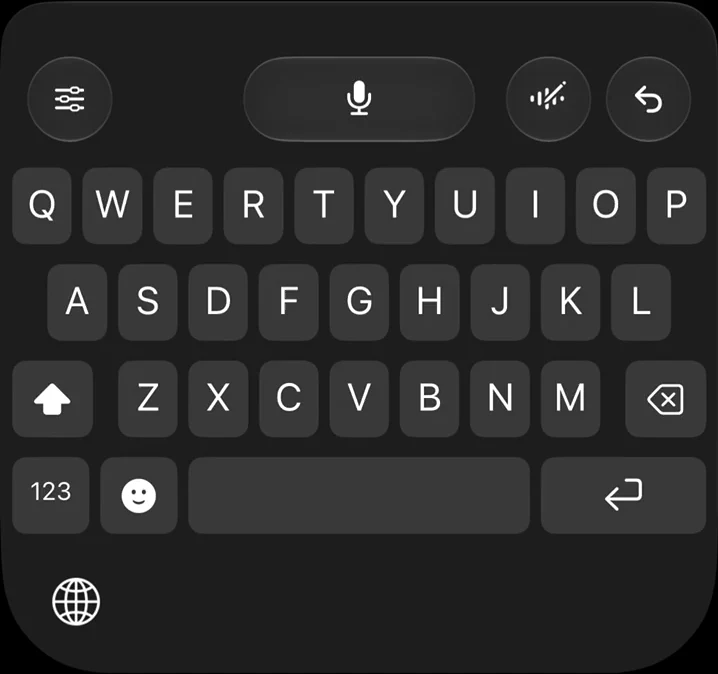
- Open Aqua, enable its keyboard and turn on Allow Full Access in Settings. Give the Aqua app Microphone access too.
- Open a text field in Notes or another app, then choose Aqua with the globe key.
- Tap the microphone, speak, then tap again to finish.
Aqua may open its app to start a microphone session. Once that session is active, you can work from the keyboard. Secure fields and some apps use the system keyboard.
Try a short note in the app you normally use. Include switching keyboards in your trial, so you can judge how it fits your routine.
Do you need a different keyboard on Android?
On Android, you can keep your usual keyboard. In Aqua’s English demonstration, look for the separate Aqua microphone button beside it.
Aqua Voice
Install Aqua on Android 10 or later and follow the setup instructions in the app. Open the field you want to write in, tap the Aqua button and speak. Tap the check mark to finish.
Try speaking a short message you would normally type. Keep your familiar keyboard and see how the words arrive in the field.
How do you make the first 1,000 words count?
Once text appears, check whether it is ready for your work. Try a short email with a person’s name, a meeting time and a term you use on the job. That gives you something useful to correct, too.
Speak in your usual app.
Check that the message appears in the field you intended.
Read it as if you were about to send it.
Check names, work terms and punctuation.
Change the time.
Select the time. On desktop, hold the Aqua key and say “Change 5pm to 6pm.” On a phone, select the text, tap Aqua’s Edit button and speak the same change.
Use the dictionary for work terms. On desktop, add an entry with “+ Add”. If a name or specialist term comes out differently from how you write it, save your spelling and try again.
The free allowance is 1,000 words, rather than 1,000 characters. It does not refill every month. Once you use it up, you need a paid plan to continue. The cloud dictation shown here needs an internet connection.
Look beyond how many words were right on the first pass. After a correction, could you send the message as it stands? That is the useful test of whether you want to keep using it.
What does it cost to keep using it?
Use the free words on your own writing first. If Aqua fits your work, these are the individual plans on its website.
| Plan | Monthly billing | Annual billing |
|---|---|---|
| Pro | $12 per month | $120 per year ($10 per month) |
| Max | $24 per month | $228 per year ($19 per month) |
Pro includes unlimited words, an expanded dictionary and custom instructions. Max adds Realtime Mode, which shows text as you speak, and the “Send it” voice command. App store prices may differ.
You do not need separate subscriptions for your computer and phone. One subscription covers Mac, Windows, iPhone and Android.
Start your free 1,000 words on the device where you write most. Finish one message with a name and a time, then decide whether to pay.
Comments
No comments yet. Ask a question or share what worked for you.